
September 21, 2026
People Search Data in Bulk: 14 Sources, What Each One Returns
Fourteen people search sources, side by side. This guide shows what each one gives you, what you can look someone up by, and which to reach for depending on what you already know.
Pick a people search source by what you already have
People search sites all look alike from the outside. They stop looking alike as soon as you read the results. The quickest way to choose is to start from what you already have, not from the site.
| You have | You want | Use |
|---|---|---|
| A name and a city or state | The most fields, emails included | TruePeopleSearch |
| A list of hundreds of names | One run instead of one run per person | TruePeopleSearch |
| A phone number | The person behind it | ThatsThem, ZabaSearch |
| An email address | The person behind it | ThatsThem |
| A street address | Who lives or lived there | FastPeopleSearch, FastBackgroundCheck |
| A common name and a state | Every candidate, not just the top one | Spokeo |
| A result you need to trust | A second opinion | Any second source, as explained below |
| A Canadian, French, German or Swedish name | A residential listing outside the US | The national directories below |
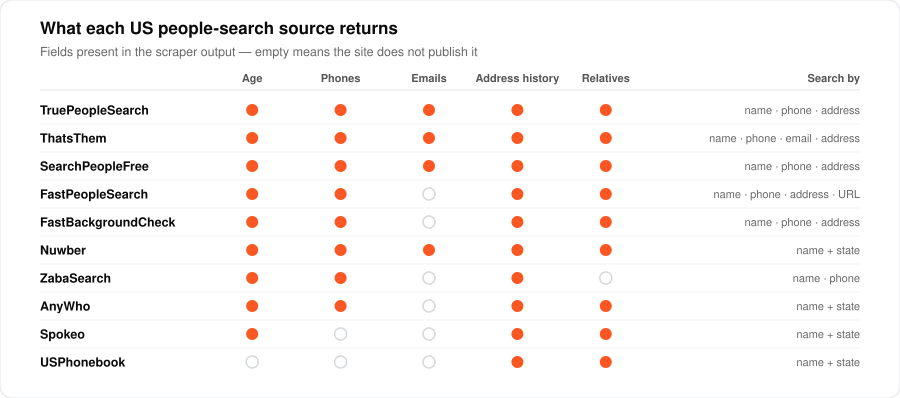
What each US people search source returns
Ten US sources, side by side. A blank cell means the site itself does not show that field to a signed-out visitor. It is not something the export leaves out.
| Source | Search by | Age | Phones | Emails | Address history | Relatives |
|---|---|---|---|---|---|---|
| TruePeopleSearch | name, phone, address | yes | yes | yes | yes | + associates |
| ThatsThem | name, phone, email, address | yes | yes | yes | yes | + associates |
| SearchPeopleFree | name, phone, address | yes | yes | yes | yes | yes |
| FastPeopleSearch | name, phone, address, URL | yes | yes | yes | + associates | |
| FastBackgroundCheck | name, phone, address | yes | yes | yes | yes | |
| Nuwber | name + state | yes | yes | yes | yes | yes |
| ZabaSearch | name, phone | yes | yes | yes | ||
| AnyWho | name + state | yes | yes | yes | + aliases | |
| Spokeo | name + state | yes | yes | yes | ||
| USPhonebook | name + state | yes | yes |
TruePeopleSearch: bulk lookups and a match check on every record
TruePeopleSearch gives you the most per person: age, current and past addresses, phone numbers, emails, relatives and associates.
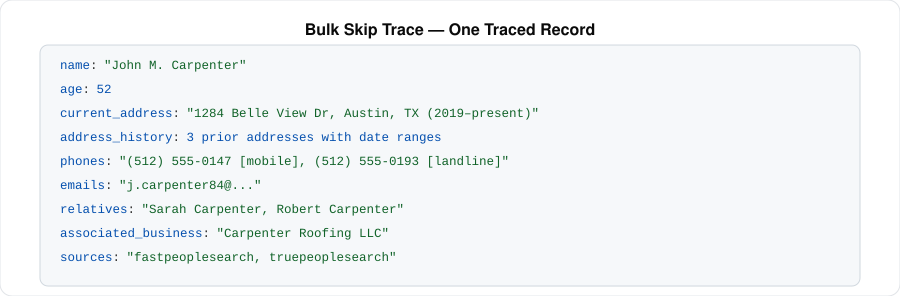
It is also the one built for lists. You can hand it several hundred names and get them all back from a single run instead of starting a run per person. That is much faster than it sounds: the site's bot check gets solved once for the whole list rather than once for every name. Each result is tagged with the search that produced it, so you can match the output back to your original spreadsheet row.
And it tells you when it is unsure. A reverse lookup can hand back the previous owner of a phone number, someone else in the household, or whoever lived at an address before your person did. TruePeopleSearch flags whether the thing you searched for was actually confirmed on the profile it returned. Unconfirmed does not mean wrong, and for tracing, a household or previous-occupant link is often the lead you wanted. But you can filter those out when you need certainty.
ThatsThem: the only reverse email lookup here
ThatsThem returns the same fields as TruePeopleSearch and does one thing no other source here can: it takes an email address. Give it an email, get back a name, an age, phone numbers and an address.
It also marks records as deceased, which is worth knowing before a list goes out to a call or mail campaign. Its other three ways in, by name, phone or street address, overlap the rest of the table, which makes it a natural second opinion when a result needs confirming.
Spokeo: find every match for a common name
Spokeo is the odd one out and the useful one. It returns no phone numbers and no email addresses. In exchange, it is the only source here built for breadth instead of depth.
Spokeo shows about 30 people on a state results page. The export keeps going through the metro and city pages underneath, and typically brings back more than 100 different people for one name in one state. Use it when the name is common and you do not yet know which John Smith you are after. You get name variants, where each person lives now, where they lived before, and who they are related to. That is usually enough to pick the right one, and then you look that person up somewhere that carries contact details.
Reverse address lookup on FastPeopleSearch, SearchPeopleFree and FastBackgroundCheck
These three work much like TruePeopleSearch with slightly fewer fields, and all three take a street address and return the people living there now and before.
- FastPeopleSearch also accepts a profile link you already have, which lets you pull a record again without paying to redo the search.
- SearchPeopleFree includes email addresses, which FastPeopleSearch does not.
- FastBackgroundCheck adds aliases and a timeline of past addresses.
ZabaSearch, Nuwber, AnyWho and USPhonebook: the lighter sources
Four narrower sources, handy as cross-checks and as a cheap first pass.
- ZabaSearch takes a name or a phone number and returns age, addresses and phones. No emails, no relatives.
- Nuwber takes a name and state only, but does include emails and relatives.
- AnyWho is old phone-book data, and adds aliases.
- USPhonebook returns no phone numbers. The site only shows them to signed-in users, so there is nothing on the page to read. Looking someone up by number was removed for the same reason: the result would come back with no number in it. It is still a decent source for addresses and relatives. It is not a phone source, whatever the name suggests.
Check a skip trace against a second source
People search sites disagree with each other, and that is the reason to use two rather than a reason to distrust them.
Run your list through one source, then run the hits through a second. A phone number that shows up on both is one worth calling. It is the cheapest way to lift your connect rate before a campaign, and it costs you one more pass over the names that matched.
Pair sources that index differently instead of two of the same kind. TruePeopleSearch and ThatsThem is the strongest pairing: different indexes, both carry emails, and ThatsThem can re-check by email what TruePeopleSearch found by name.
People search outside the US: Canada, France, Germany, Sweden
Four national directories cover residential listings beyond the US. These are phone books rather than data-broker databases, so you get fewer fields and better accuracy.
| Country | Source | Search by | Returns |
|---|---|---|---|
| Canada | Canada411 | name + city, phone | name, phone, street address, postal code, map coordinates |
| Germany, Austria, Switzerland | DACH directories | name + city, phone | name, landline and mobile, street address, postal code, district |
| France | PagesBlanches | name, phone | name, landline and mobile, street, postal code, commune, department, region |
| Sweden | Hitta.se | name | age, phone, street address, municipality, county, coordinates, household members |
The DACH option covers three countries at once, Das Telefonbuch in Germany, tel.search.ch in Switzerland and Herold in Austria, so a name that could be in any of them takes one run rather than three. Canada411 covers every province and returns businesses alongside households. Hitta.se is the only one outside the US that publishes age, and it lists household members too, which is the closest thing Europe has to the US relatives field.
Is people search data legal to use
The data comes from public records. What you are allowed to use it for is the part that is regulated, and it depends where you are.
In the US, the dividing line is FCRA. Decisions about employment, credit, insurance or housing have to go through a consumer reporting agency, and none of these sources is one. Debt collection outreach falls under FDCPA, and calling the numbers you find falls under TCPA rules. Property investor outreach, debt recovery, litigation support and consumer lead building are the everyday cases. Know which one you are in before you dial.
In the EU, the four national directories return personal data covered by GDPR. Collecting it in bulk needs a lawful basis you can point to, and you generally have to tell people you hold their data when you got it from somewhere other than them. A phone book entry is public. A list you build out of one is processing.
Where to start
Pick one source and run something small. Pull 50 records, look at how many came back with a usable phone number for your actual names, and only then decide whether a second pass is worth it. Hit rates vary far more by how common the name is and where the person lives than by which site you chose.
You pay for the records you get back, and there is no batch minimum, so a one-off job of a few hundred names costs what those few hundred records cost. Current pricing for each source is on its own page, linked from the tables above.
For the tracing workflow end to end, read How to Get Skip Tracing Data at Scale. If what you actually need is company contacts rather than people, registered agents, directors and filing addresses, the registry route is usually better: see How to Get Company Registry Data in Bulk, or browse the full Lead Generation catalog.